- Services
- Dynamic Captions
- Animated Avatars
- BWT Videos
- ChatBot Agents

AI ChatbotsSupport more customers with a friendly greeting and helpful chatbot agent.
- Chatbots Category
- Video Editing

April 2026
Camtasia 2026 Certification With Audiate 2026-04-13
With Audiate you have a wide range of AI tools to work with. Including AI speech to text conversion with textual editing capabilities and AI voice and character generation. That means you can input a written script and output an AI generated avatar spokesperson tutorial with narration, if you were so inclined.

Or, you can edit an existing narration lickity split with slick voice analizer tools. Create polished tutorials that sync audio narration with AI generated avatars. Eliminate or silence uhs, ums, ahs and pauses.
Sounds simple, right? Well it isn't, I recommend taking the Camtasia Certification course first. It ain't as easy as it looks. This comprehensive course walks you step by step through how to use Camtasia 2026 effectively. I took the course and came up with this video I call Camtasia Menagerie. Check it out...
Camtasia Certification Course includes 11 learning modules with quizzes and source materials. You get a journey from beginning a project to recording your camera and screen to editing, exporting and publishing a polished masterpiece. When finished you get a Certificate of Completion like this one.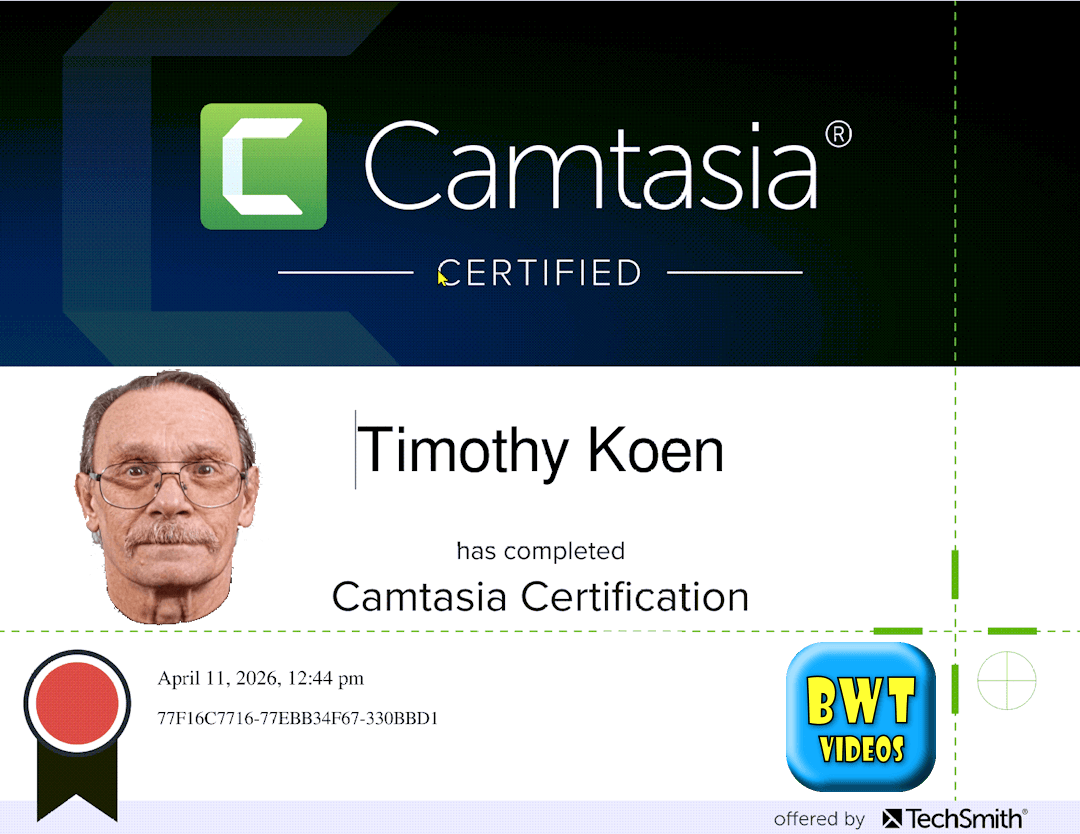
This Camtasia Certification course covers most but not every aspect of recording and editing a screencast video. It is broken down into specific areas of study including screen recording, video editing, audio editing, visual effects, captioning, animation, asset management and publishing. The curricullum is organized to walk you through creation of a video from intro to final delivery.
Website tips for this post are:
The basic level has some features and succeeding levels have greater capabilities. The top or Pro level includes text-to-speech voice narration, AI generated lip synced avatars and script generation.
The only downside to Audiate is the recurring subscription fees. There are similar 3rd party products on the market that are less expensive and one time only charge. But are not integrated into Camtasia.
If you have a Camtasia subscription that is "Business" level or higher you can download Audiate for free and take advantage of some of the script editing functions. But not the AI character or script generation tools.
Once again Camtasia tops out the class of screen recording video editors. Excellent for making tutorials and general video editing. Some may argue that Camtasia is Not a high end editor (compared to others). Camtasia is actually a complex NLE (non-liear editor) with track stacking timeline editing construction.
Camtasia actually is very well equipped for advanced animation, motion graphics and audio sweetening. Learn how to use Camtasia to make screen recording tutorials on the next page...

DaVinci Resolve 21b New Photo Page Tips 2026-04-25
DIA Statues Photo Album
Website tips for this post:

Photos can be accessed across 4 pages. Photo, Color, Fusion and Deliver. Which allows you the full range of capabilities including adding text, motion, effects and optimizing color and white balance. Especially usefull when matching still photos with video footage.
Exporting on the Deliver page has a photo album option under custom export. Where you can export the entire album or selected images. Which includes all the changes you made to your images.
All the changes you make to your images are applied to the Media Pool. Attributes remain the same over various timelines. This means that whatever changes you did on the photo page will be the same everywhere you use them.
Adding effects are a simple drag and drop on your image. For instance did you see the Sun poking through on the first image. I added that with the "Lens Flare" effect, to achieve that look. The list of effects available are too numerous to list here. but rest assured the list is lengthy.
While the Photo page is a huge welcome addition to DaVinci Resolve it is going to be somewhat limited due to the fact it is a free upgrade. BMD could have charged a subscription fee but decided not to. So, you can rule out any heavy AI manipulation as being cost prohibitive.
Also, the concept is to edit photos in a video editing environment. Not create fantasitc full length photo animations. Although you could do that, you would need to have a lot of power and memory on your computer as cloud based AI generation is not going to happen.
Are you interested in grading or editing a photo album? Contact me at BWT Videos...
March 2026 « » May 2026
Home : Website Tips



61 W. Annabelle Ave. Hazel Park,
MI. 48030-1103, U.S.A.
telephone: (248)546-0374
email: support@best-website-tools.com
© Copyright 2007-2026 All rights Reserved.
Sun: closed
Mon-Fri: 9:00AM to 6:00PM
Sat: 9AM-12:00PM
Closed Holidays
