- Services
- Dynamic Captions
- Animated Avatars
- BWT Videos
- ChatBot Agents

AI ChatbotsSupport more customers with a friendly greeting and helpful chatbot agent.
- Chatbots Category
- Video Editing

March 2026
Create Screen Recording Tutorials 2026-03-05
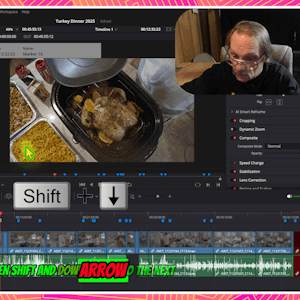
Screen recording tutorials are one of the most effective ways to demonstrate software, teach workflows and share your expertise. You may be training employees, supporting customers or building an online course library. Video tutorials help people learn quicker with less confusion.
This guide walks you through the process from planning, recording, editing, polishing and publishing a professional screen recording tutorial.
What makes a great screen recording?
A well made tutorial is clear, focused and has easy to follow content. Viewers always know what comes next and why it is important. The best tutorials combine clean visuals, strong audio, good pacing and simple instructions, to guide viewers through a well defined process.
BWT Videos put together this guide that walks you through what you need to create an organized, professionally polished video tutorial. See for yourself...

How To Create Screen Recording Tutorials 2026-03-08
Step 1. Pick the right tools: There are several options available. Including Camtasia, Snagit, OBS Studio and Wondershare DemoCreator. These platforms range from free software to high end video editing platforms.
Step 2. Plan Your Tutorial. Create an outline of your topic with a clear goal in mind. Ogranize all your media and determine what your final product will be.
Step 3. Record Your Screen. Several key factors go into creating a screen recording. Read the full guide to get detailed descriptions.
Step 4. Edit Your Tutorial. This is where you polish the content and make it professional. The guide includes many tips and techniques you could use to make polished, professional tutorials.
Step 5. Narrations and Captions. Narration is just as important as the visuals. It gives you control over the delivery of information. Captions or subtitles add accessibility and improve overall retention. Dynamic captions add more information and add motion graphics to the mix.
Step 6. Export and Publish. Once your video is ready for release publish it in the format that suits your audience. Here are some guidelines that you could follow. Read the full tutorial...
Frequently Asked Questions and Answers Page Updated 2026-03-21

Did you know FAQ's are an important tool in every webmasters arsenal? FAQ's eliminate back and forth emails as well as reducing time to solutions. FAQ's can answer questions before they are asked. They can convey a level of service provided, turnaround time, intricate details and quick answers.
New in FAQ & A are the most popular questions we recieved about creating screen recording tutorials. I found that the FAQ has greatly reduced the time I spend supporting customers and defining processes. Also, questions are more precise and detailed due to all the information conveyed in the FAQ. Check out the new info on...
Edit Video Order Box Upgrade 2026-03-25
What am I talking about? An offer box for a video creation service. Various optons are selected in the tab menu to switch between different levels of the service. Here it is...
Here's How To Order A Video
Video Editing Services
- 2 minutes final cut
- Submit Up to 10 minutes of footage
- Simple editing (cuts & fades)
- Mix audio
- Full HD, (1080p), .mp4 file
- 1920x1080px thumbnail image.
You get:
- (1) Finished video
- Basic video editing
- Basic audio mixing
- Outtake removal
- Background fill
- Thumbnail Image
- Overlay animated text (Tilte, Slogan, Text)
- Animation
- Fancy transitions
- Color correction
- Special effects
- All content files
Basic Video - $30.00

use code "BWT10off" for 10% Discount
Wait before you click the button.
Contact us first for a free consult. Use the form below to discuss your project before you commit.
Video Editing Services
- 5 minutes final cut
- Submit Up to 15 minutes of footage
- Simple editing (cuts & fades)
- Mix audio
- Full HD, (1080p), .mp4 file
- 1920x1080px thumbnail image.
You get:
- (1) Finished video
- Standard video editing
- Standard audio mixing
- Outtake removal
- Background fill
- Thumbnail Image
- Overlay animated text (Tilte, Slogan, Text)
- Animation
- Basic transitions
- Color correction
- Special effects
- All content files
Standard Video - $50.00
use code "BWT10off" for 10% Discount
Wait before you click the button.
Contact us first for a free consult. Use the form below to discuss your project before you commit.
Video Editing Services
- 10 minutes final cut
- Submit Up to 20 minutes of footage
- Advanced editing (animated transitions, text overlays)
- Mix audio
- Full HD, (1080p), .mp4 file
- 1920x1080px thumbnail image.
You get:
- (1) Finished video
- Advanced video editing
- Advanced audio mixing
- Outtake removal
- Background fill
- Thumbnail Image
- Overlay animated text (Tilte, Slogan, Text)
- Animation
- Fancy transitions
- Some Color correction
- Minor special effects
- All content files
Premium Video - $75.00
use code "BWT10off" for 10% Discount
Wait before you click the button.
Contact us first for a free consult. Use the form below to discuss your project before you commit.
Video Editing Services
- 10 minutes final cut
- Submit Up to 25 minutes of footage
- Premium editing (animated transitions, text overlays)
- Premium Audio Mixing
- Pro Color correction
- Special Effects
- UHD, (4k), .mp4 file
- 1920x1080px thumbnail image.
You get:
- (1) Finished video
- Premium Video editing
- Premium audio mixing
- Outtake removal
- Background styling
- Thumbnail Image
- Overlay graphic text (Tilte, Slogan, Subtitles)
- Animation
- Fancy transitions
- Pro Color correction
- Special effects
- All content files
Custom Video - $200.00
use code "BWT10off" for 10% Discount
Wait before you click the button.
Contact us first for a free consult. Use the form below to discuss your project before you commit.
Delivered in Full HD, 1080p/MP4 use for YouTube, social media, website or online platform. You can specify format for delivery, (1080p, 16:9, 720p, 600px Square).
Here Is How Video Making Works:
- Contact BWT Videos and explain your project
- Determine end result
- Submit media for editing
- Collect or create other media elements
- Video & Sound production
- Assemble and Edit Video
- Delivery
I will ask you for
- Content (video/audio footage).
- Voice over script (if you have one).
- Slogan, title and tagline.
- Desired format i.e. 4k, 1080p, FB Cover, Square, 16:9, etc.
- Special requests
- contact info
What Happens when you Order A Video
 We guarantee satisfaction. BWT Videos promises to do our best upfront. So you get the video you expected. We offer free support for 30 days. If you are not satisfied please let us fix it for free.
We set up an email communications with you and ask for specific details about your project. With this information we construct a personalized video just for you. We may make sugestions to help improve your project. If you have specific media you want included send them to us.
When ready you get a preview of the work to approve. Remember that a custom video is the best way to get the most options. You can't go wrong with BWT Videos. I promise. Order Now!
I made this long before AI came along and recall having difficultiy debugging it properly. So, I asked MS Copilot for help. It did not. Thank goodness I knew how to fix it myself. Video editing by Tim Koen is available at BWT Videos...
Home : Website Tips



61 W. Annabelle Ave. Hazel Park,
MI. 48030-1103, U.S.A.
telephone: (248)546-0374
email: support@best-website-tools.com
© Copyright 2007-2026 All rights Reserved.
Sun: closed
Mon-Fri: 9:00AM to 6:00PM
Sat: 9AM-12:00PM
Closed Holidays
