- Services
- Dynamic Captions
- Animated Avatars
- BWT Videos
- ChatBot Agents

AI ChatbotsSupport more customers with a friendly greeting and helpful chatbot agent.
- Chatbots Category
- Video Editing

November 2025
Microsoft 365 Now From BWT Videos Office Tools For Online Business 2025-11-01

I think so. Creating content has become so much easier with the AI assistance of CoPilot with all the favorite office programs. Word, Excel, Power Point, Outlook and CoPilot all in a nice bundle. Microsoft365.
Available Plans Comparison
Plan |
Annual Price(per user) |
Monthly Price(per user) |
Key Features |
|---|---|---|---|
| Business Basic | $6.00 | $7.20 | Identity/access/user management (up to 50 employees), custom business email, web & mobile Word/Excel/PowerPoint/Outlook, Teams Chat/video, 1Tb storage, 10+ apps, spam & malware filtering, phone & web support. |
| Business Standard | $12.50 | $15.00 | Everything in Basic, plus desktop Office apps, webinars with attendee registration, collaborative workspaces (Microsoft Loop), video editing (Clipchamp), secure cloud services. |
| Business Premium | $22.00 | $26.40 | Everything in Standard, plus advanced identity & access management, enhanced cyber-threat & endpoint protection, sensitive data classification & protection. |
| Microsoft 365 Apps for Business | $8.30 | $9.96 | Desktop Word/Excel/PowerPoint/Outlook, 1Tb cloud storage per user, phone & web support, secure desktop/web/mobile apps. |
Microsoft 365 Apps & Services
- Word
- Excel
- PowerPoint
- Outlook (personal email address)
- OneNote (word processor)
- OneDrive for Business (1Tb cloud storage)
- Copilot (advanced AI chatbot)
- Microsoft Teams (chat, meetings, video)
- SharePoint Online (team sites, intranet)
- Planner (task management)
- Forms (surveys & quizzes)
- Sway (interactive reports)
- Bookings (online scheduling)
- Yammer (enterprise social network)

SBI Halloween Sale Held Over 2025-11-03

I have been using SBI for nearly 20 years and promote it whole-heartedly. Theorectically, SBI is the best deal ever. For a low annual fee you should be able to achieve financial independance. But, you have to work at it. SBI is not a get rich quick scheme. It is a collection of online business tools that need to be used to be effective. Check it out...
SBI's online business tools afford anyone the opportunity to create personal wealth. They also require a (not-so steep) learning curve to learn how to do it right. And that is where SBI exceeds expectations.
The amount of support, instruction and knowledge available is very impressive. The step-by-step Action Guide walks you through the process in a well thought out tutorial. Along with numerous tips, tricks and techniques needed to succeed. To learn more click the link below...

Reedjet Rebuild Main Bearing Install A Video Presentation 2025-11-14
 Oh, the magic of AI. In this video I used an AI tool to speed up the editing process. A best website tool called "Ripple Delete Silence" in Davinci Resolve 20.2. This tool analyzes the content and cuts out any silent portions automatically.
That's cool! Instead of doing time lapse and fast editing and other time consuming tricks now I can edit a show and tell in minutes.
So, if your intent is to shorten your clips to only those portions with voice you're going to love this tool. It does make the result a little choppy. But choppy is way better than boring. Check out this video...
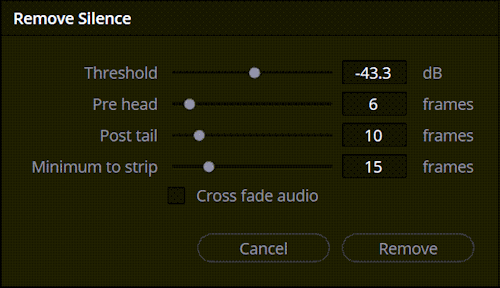
Ripple Delete Silence in Davinci Resolve 20 removes silent portions of a video clip with the use of AI. The tool analyzes the clip and cuts out any silent portions. It does capture surrounding background sounds as you will see in the above video. Control of the edit points boils down to threshhold, pre-head, post-tail and minimum to strip.
- Threshhold: defines the loudness of the sound to keep
- Pre-head: sets how many frames ahead of the portion to keep.
- Post-Tail: sets number of frames to keep after the sound.
- Minumum to Strip: set the number of required frames to delete.
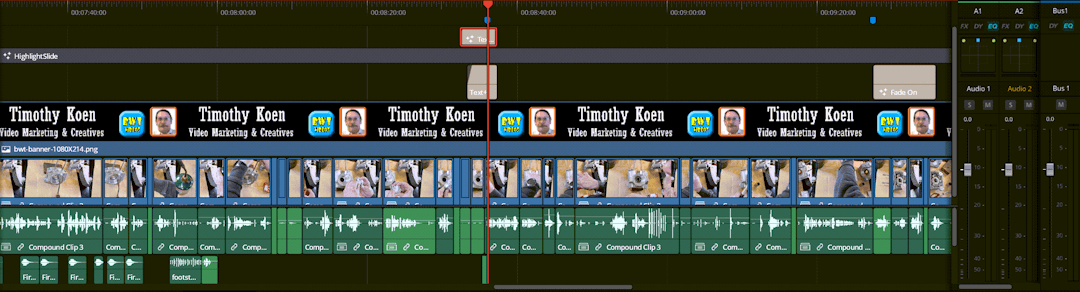
Editing after ripple to delete silence allows you to add fusion effects, transitions and other elements. A good idea is to use markers to help keep your timeline organized.
Clean Small Parts For Parilla Reedjet Rebuild 2025-11-20
Clean Small Parts
Website tips for this post are:
 Is 4k resolution right for your next video? Depends on your desired result. Advantages of 4k over say (1920x1080)FHD are increased resolution and sharper pictures with more dynamic range but also has much, much larger file sizes.
- Persistence of vision: is how the eye works, It takes about a tenth of a second for the brain to even percieve motion. And another tenth of a second to react. At around 16 frames per second the brain begins to see gaps in motion. This phenomina is called flicker. Motion becomes smoothed out with higher frames per second.
- Time lapse: allows you to change the number a frames recorded per second. If you record motion at a lower frames per second (fps) and then play it back at a higher fps motion appears to go faster but it looks choppy and overspeed. Which can be used to compress time in a video.
- 4k vs. UHD: this video is an experiment I wanted to do. At the expense of using up all my disc space recording at the higher 4k, 4.2:1 DCI (widescreen) resolution as opposed the the normal UHD (3840x2160) like most video that I shoot. I went with a frame rate of 3fps and playback at 30fps.
- 3fps vs 30fps:this video is sped up by a factor of 10. That means if the video is 57 seconds, then I actually spent 57 minutes cleaning parts. An amount of time that would fill up my portable ssd recording drive. So, time lapse works for this video and saved a lot of disc space.
Shooting time lapse is ideal to record events that take a long time. Like cleanning small parts in a Parilla Reedjet motor. I knew this footage would be boring as all get out, but would look great (At least to me). what do you think...
Killer Turkey Dinner Grabs A Family Video 2025-11-28
How To Quickly Grab Stills In DaVinci Resolve
Website tips for this post are:
Some videos are nothing more than a series of still shots that are animated and time stretched. In other words a bunch of individual frames edited together. Sounds simple right? Not so fast gunslinger. First you have to export the frames out of the footage as still frames. How you gonna do that, in DaVinci Resolve 20, Quick Draw Mcgraw? With a custom made keyboard shortcut, pardner.
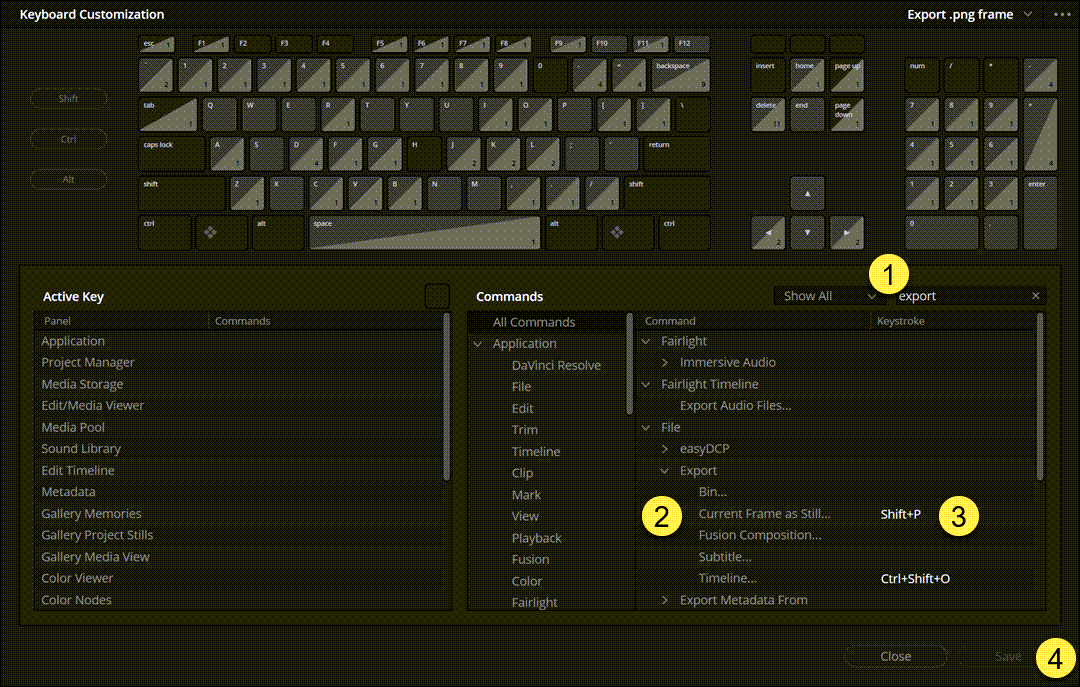
- Open up the "Keyboard Customization" panel under the "DaVinci Resolve" menu, and in the search box type in "export." Then open the dropdown menu with a list of options.
- Locate "Current Frame as Still" option, then...
- Select the keyboard shortcut textbox and type in a shortcut that isn't already used. In this example I chose "Shift + P" Hold down the shift key and tap the "P."
- Click "Save." Now you have a shortcut to quickly capture stills from video frames. Now when you position your playhead over a frame on the "Cut", "Edit" or "Color" page you can capture a still by holding down the "Shift" key and clicking the "P" key.
Koen Family Turkey Dinner video employed this technique to grab stills from over 55 minutes of footage to generate a synopsis type video of much shorter duration. Almost anything is possible with exceptional editing capabilities. Make your video stand out from the competition...
October 2025 « » December 2025
Home : Website Tools



61 W. Annabelle Ave. Hazel Park,
MI. 48030-1103, U.S.A.
telephone: (248)546-0374
email: support@best-website-tools.com
© Copyright 2007-2026 All rights Reserved.
Sun: closed
Mon-Fri: 9:00AM to 6:00PM
Sat: 9AM-12:00PM
Closed Holidays
