- Services
- Dynamic Captions
- Animated Avatars
- BWT Videos
- ChatBot Agents

AI ChatbotsSupport more customers with a friendly greeting and helpful chatbot agent.
- Chatbots Category
- Video Editing

Screen Recording Tutorials Explained

BWT Videos specializes in creating polished screencast videos that teach, onboard, support and elevate your audience's knowledge.
Years of experience and state of the art equipment with all the right tools means you get the best tutorial possible. This article shows you what you need, where to get it and how to use it.
How A Screen Recording Tutorial Works
People learn by watching it in action. A structured screen recording reduces confusion, shortens onboarding, and eliminates repetitive explanations. Businesses use these videos to train teams, creators use them to teach online, and marketers use them to demonstrate products with clarity and confidence.
BWT Videos brings years of Camtasia experience, professional editing, and a massive asset library to ensure every tutorial we build looks modern and communicates clearly.
What's In a Screencast Video
Clean, intentional tutorials using Camtasia's © powerful screen capture and editing tools. You get zooms, highlights, callouts, cursor emphasis, and annotations guide the viewers attention so every step is easy to follow.Webcam overlay can be added for a more personal learning experience. Personalize the tutorial with a spokesperson presenter. That could be an AI generated avatar from our library or from a webcam.
Professional video editing with 20 years experience using state of the art techniques and equipment. BWT Videos knows how to create tutorials that emphasize your message. Combine an AI animated avatar with voice-over in your video tutorial.
Need a spokesperson to narrate your tutorial? You might be interested in our AI animated avatars. We have many styles of avatar to choose from. You can use a human animated avatar, a cartoon character, even start with a photo. Or, let me choose for you. Ask me how.
Professional Video Tutorial Service
What You Get
- Polished Tutorial
- Screencast Recordings
- Sound Mixing
- Video Editing
- Overlays & Titles
- Special Effects
- Source Files
- Fast Turnaround
Starting at $5 Order on fiverr:

How to get a screencast tutorial made

- Share your concept or workflow.
- Choose full production or editing-only service.
- Approve the script or outline.
- Receive a polished, retention-optimized tutorial.
- Publish anywhere - LMS, YouTube, internal training, customer support, social media.
- Your tutorials arrive ready to use, in 4K or 2K, with all source files included.
Frequently Asked Questions
BWT Videos Tutorial Reviews

Click thumbnails to screen video
Professional Production Experience: The service is built upon years of experience. In business since 2018, Camtasia training across multiple versions, and an education in CADD, Broadcast Electronics, Mass Communications, plus a decade as a Sr. Video Engineer. This ensures consistent color, clean visuals, and disciplined communication.

Two Ways We Work Together
- You can choose full production where screen recording and editing are handled end-to-end. Or,
- Provide your own Camtasia recordings for professional refinement.
Both options result in tutorials that feel intentional, sound clear, and move at a pace viewers can follow without frustration.
Option 1 includes everything from idea to delivery. All I need to start is a concept and a goal. We can create everything else. Including scripting, screencast footage, video editing, audio mixing and special effects.
Option 2 is where you submit your Camtasia screen recordings for editing and polishing. You get to take advantage of our huge library of assets, sound effects, animations and special AI tools. (recommended)
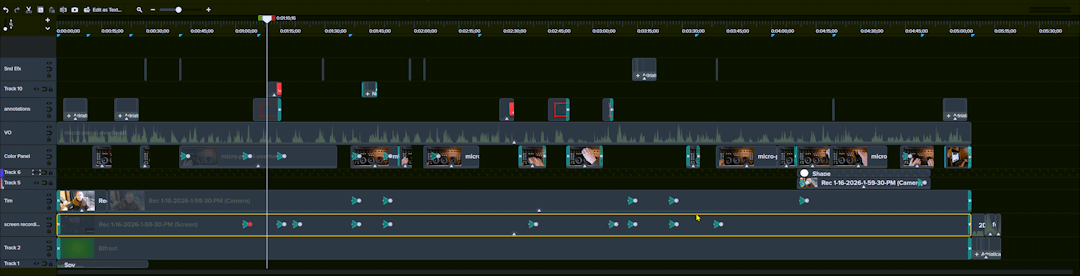
A BWT Videos tutorial includes: Clean, intentional, polished screen recordings. Includes zooms, highlights, callouts, and cursor emphasis. Optional webcam or AI avatar presenter narration. Professional editing, sound mixing, and pacing complete the video tutorial.
Where These Tutorials Are Used
Videos are delivered in 4k UHD, or 2k HD, .mp4 format and ready for LMS platforms, internal training libraries, customer help centers, YouTube, FaceBook, LinkedIn, Instagram, course portals, websites or private knowledge bases. Each tutorial is structured to build confidence, reduce confusion, and help viewers complete tasks immediately after watching.
Video tutorials can be used in a wide variety of applications. They are excellent for training new employees, supporting customers or demonstrating a new product or service.
Businesses That Use Video Tutorials
- Bakery
- Business Lending
- Business Services
- Cardiologist
- Car Dealer
- Car Rental
- Catering
- Child Care
- Chiropractor
- Cleaning Service
- Computer Repair
- Concrete Service
- CPA
- Dance Classes
- Dentist
- Dent Repair
- Dog Training
- Dry Cleaning
- Electrician
- Equipment Rental
- Financial Planner
- Florist
- Funeral Services
- Golf Instruction
- Gym
- Hair Restoration
- Hair Salon
- HVAC
- Insurance Agent
- Jeweler
- Kitchen Bath Remodeling
- Laser Hair Removal
- Lasik
- Locksmith
- Mechanic
- Mortgage Company
- Moving Company
- Nanny
- Optometrist
- Orthodontist
- Painter
- Paving Company
- Pawn Shop
- Personal Injury Lawyer
- Personal Trainer
- Pet Grooming
- Pet Sitting
- Photography
- Physical Therapist
- Plumber
- Pool Installation
- Real Estate Agent
- Senior Care Facility
- SEO
- Small Biz Video
- Solar Panels
- Storage Facility
- Tattoo Removal
- Tax Consultant
- Tire Shop
- Teeth Whitening
- Towing Company
- Travel Agent
- Veterinarian
- Video Marketing
- Water Filtration
- Water Heater
- Website Design
- Wedding Planner
- Weight Loss
- Window Replacement
- Window Washing
- Windshield Repair
- Yoga Classes
BWT Videos Knowledge Retention Strategy
BWT Videos designs every screen recording tutorial to help viewers remember more, understand better, and repeat tasks accurately. Our strategy is built around five core principles that shape how each tutorial is recorded, edited and delivered.
1. Dual channel learning: show it and say it
People retain more when information is delivered through both visual and verbal channels. BWT Videos pairs clear onscreen demonstrations with concise narration so viewers absorb the workflow through multiple senses. This reduces confusion and strengthens long-term retention.
2. Focused, task based micro-lessons
Long videos overwhelm viewers, while short, targeted tutorials improves retention and completion rates. Each BWT Videos tutorial is structured around one task, one workflow, or one outcome, making the content easy to follow, easy to search, and easy to revisit later.
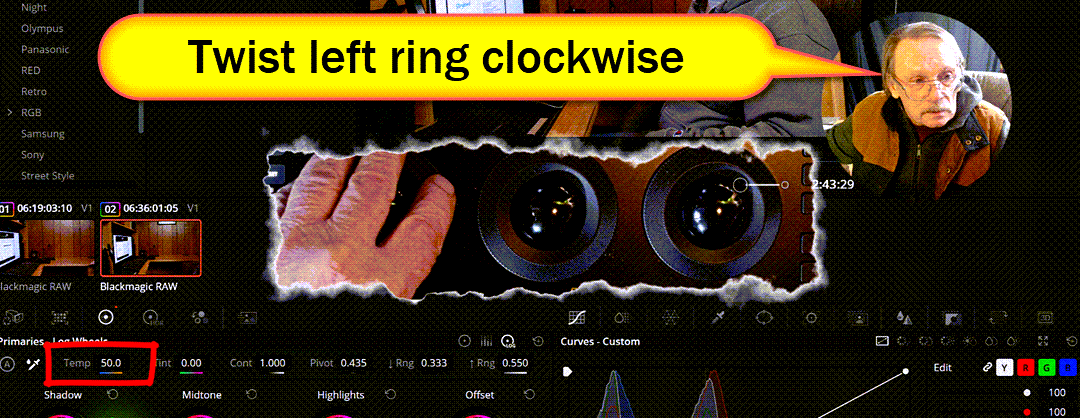
3. Visual cues that guide attention
Learners remember steps better when their attention is directed to the right place at the right time. Using Camtasia tools such as zooms, highlights, callouts, cursor emphasis and annotations, BWT Videos reinforces key actions and reduces cognitive overload. Every cue is intentional and supports the learning objective.
4. Replay-friendly pacing and structure
Retention increases when learners can pause, rewind, and rewatch content without losing context. BWT Videos edits tutorials with clean pacing, logical chapter breaks and consistent formatting. Making them ideal for LMS platforms, internal training libraries and customer support centers.
5. Clear narration that strengthens memory
A well paced voiceover helps learners encode information more effectively. BWT Videos provides professional narration, webcam overlays, and AI presenters to deliver instructions with clarity, confidence, and consistency, reinforcing the steps shown on screen.
How this strategy benefits you
- Viewers remember steps longer.
- Training time decreases.
- Support tickets become less frequent.
- Teams onboard new members faster.
- Customers feel more confident using your product or service.
- Tutorials become reusable assets throughout your organization.
TechSmith explains the science of why video training works.* BWT Videos turns that science into repeatable, professional production that helps real people learn faster and retain more.
Why Choose BWT Videos
BWT Videos features high end computer equipment coupled with a state of the art editing platform and a massive asset library. The result is screen based content that looks modern, feels organized, and delivers your message with clarity and precision. Professionaism, engineering, design and years of experience go into every project.

Clients value the combination of technical precision, clean editing and a repeatable production process. Check out the screen recording tutorial service here...
Other Screen Recording Services
Create Screen Recording Tutorials
Learn the best practices to create professional video tutorials that your audience will appreciate. Teach, onboard and educate your viewers.
BWT Videos put together this guide that walks you through what you need to create an organized, professionally polished tutorial. See for yourself...
See Also:
3d Animated Avatars - Meet the family of 3d animated spokespersons.
BWT Videos - animation, video editing and tutorial services.
Video Editing - where you can custom order a video.
BWT Videos Services - video creation, marketing and distribution services in a nutshell.
Video App Store - do it yourself video apps. Be your own video maker.
* TechSmith article - Why Video Is the Key to Long-Term Knowledge retention
Home : Video Creation Tips Category : Screen Recording Tutorial



61 W. Annabelle Ave. Hazel Park,
MI. 48030-1103, U.S.A.
telephone: (248)546-0374
email: support@best-website-tools.com
© Copyright 2007-2026 All rights Reserved.
Sun: closed
Mon-Fri: 9:00AM to 6:00PM
Sat: 9AM-12:00PM
Closed Holidays
