- Services
- Animated Avatars
- BWT Videos
- ChatBot Agents

AI ChatbotsDelight more customers with a friendly greeting and helpful chatbot agent.
- Chatbots Category
- Video Editing
- Animated Avatars

Articles Howto Add Articles To Your Website EasyBlogs Tutorial


When you create an article with the EasyBlogs software it is RSS info is written into a speial file called rss.xml. This file is read by blog readers worldwide!RSS stands for 'Real Simple Syndication. Blog readers are everywhere. They're On iPhones, the Internet, tablets, iPods and desktops.
Short descriptions are written and your article can be picked up as new news feed by rss news aggregators and rss syndication services, too.
Understanding how articles work In the EasyBlogs Software is Helpful. Article page source code is found in the template packager of EasyBlogs.
Articles Howto Create Article Pagetypes and Syndicate Them in Your RSS Feeds
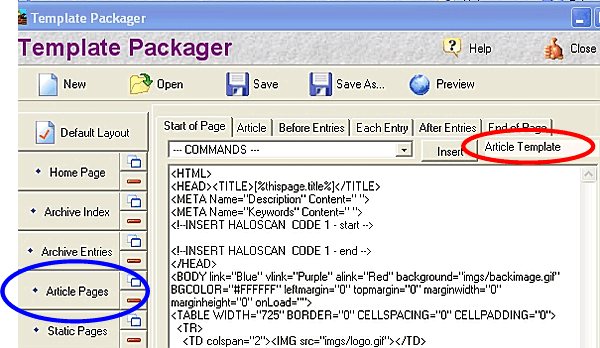
Two things happen when you create an article. First the short description that you create is written into an html page that lists all your article pages. Second the short descrition is written into a .xml file for syndication. In EB all you do is setup the template once then use the blog entry editor to add content.
Article links are generated automatically and indexed by the software on the "Article Pages" that you set up in Step 7b of TUTORIAL II in SBI RSS Tutorial: Setting Up Your News Blog.
If you did not set up the articles page and do not wish to use the articles page, please see this tutorial for clarification of what to do with the articles page in your Easy Blogs folder.
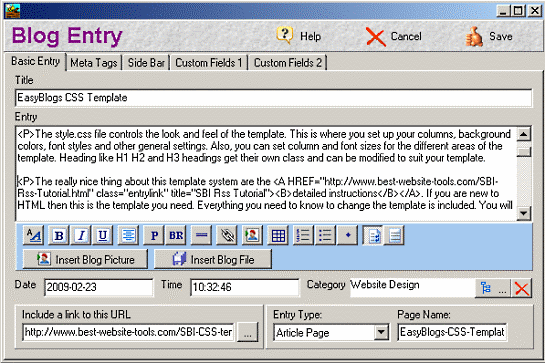
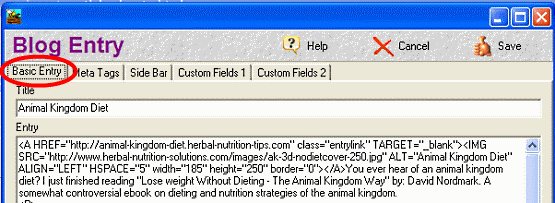
If you did not setup the articles page at the beginning and you want to change this, please see the create articles howto tutorial, How To Create Articles In Easy Blogs that are fully search engine optimized and ready for RSS syndication.
Ways to Use the articles page:
1. Generate a list of articles and have them posted by month or by title.

These articles are automatically rss'd across the web! So, not only are your entries rss'd but so are your articles when you build them in your blogging software!
If your articles are written around time sensitive information then this is an excellent bonus feature of having a 'News Blog' on your site.
You can write some of your pages in the Easy Blogs software using their HTML editor interface. Those articles will then be listed by title (with keywords in the title, of course!) and can automatically be archived in the month they were posted to your site.
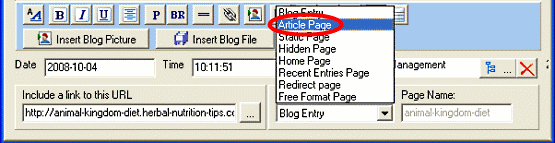
This is optional. You don't have to archive your articles by month and can just list them by title.
To create an article: Click here for a comprehensive tutorial on setting up your articles
2. If you don't wanbtor won't be having aa articles page on your website that lists your articles, then why not add them to your site map?
Why would you want to generate articles with Easy Blogs or, at the very least, link to the articles on your website from your News Blog home page?
The primary reason to use an articles page in your website is that some people will enter your site from your News Blog page. In fact, lots of people will since this page is constantly being up-dated and we know, by now, that the search engines will visit this page often as long as you keep adding new entries to your News Blog and pinging your blog.
When they get to your News Blog home page, you want them to find links to other pages of your site besides just the home page.
A link to your articles index page can be included in the navigation menu of the blog/website by checking the box, "Include Article Index in Nav Bar" in Advanced Options setup page.

articles howto

You can rename the Page name (also called the file name) for the articles page to something like "Our-Articles" and have that page shown in your menu.
That wraps up Articles Howto EasyBlogs Rss Tutorial. To get the full tutorial look here.
Home : Easy Blogs Tutorials : articles howto



61 W. Annabelle Ave. Hazel Park,
MI. 48030-1103, U.S.A.
telephone: (248)546-0374
email: support@best-website-tools.com
© Copyright 2007-2024 All rights Reserved.
Sun: closed
Mon-Fri: 9:00AM to 6PM
Sat: 9AM-12:00PM
Closed Holidays
