SBI rss blog is where you can get informaion about Solo Build It! The best website tool for online business building. August 2009
- Services
- Animated Avatars
- BWT Videos
- ChatBot Agents

AI ChatbotsDelight more customers with a friendly greeting and helpful chatbot agent.
- Chatbots Category
- Video Editing
- Animated Avatars

Easy Blogs SBI Advanced Options August 26, 2009 18:12
The Easy Blogs (EB) advanced options can dramatically increase the content on your website and number of pages. The following tutorial will show you how to get the most from EB.To get to the 'Advanced Options' you must first open a blog in the software. After you open a blog you will see the main page. This is where you get to all the sections in the software. First Select "Options' then this screen should be showing.
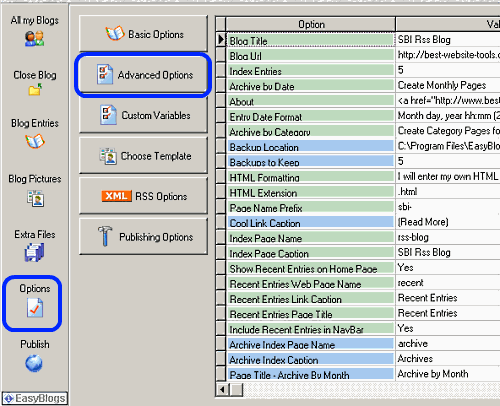
Next select "Advanced Option". This screen will show. Let's take a look at each of the selections in Advanced Options to see what they all do.
Formatting of Entries - has 2 options Read Full Article
Home : SBI Home : sbi rss blog



Best Website Tools, LLC By Timothy Koen
61 W. Annabelle Ave. Hazel Park,
MI. 48030-1103, U.S.A.
telephone: (248)546-0374
email: support@best-website-tools.com
© Copyright 2007-2024 All rights Reserved.
61 W. Annabelle Ave. Hazel Park,
MI. 48030-1103, U.S.A.
telephone: (248)546-0374
email: support@best-website-tools.com
© Copyright 2007-2024 All rights Reserved.
Business Hours:
Sun: closed
Mon-Fri: 9:00AM to 6PM
Sat: 9AM-12:00PM
Closed Holidays
Sun: closed
Mon-Fri: 9:00AM to 6PM
Sat: 9AM-12:00PM
Closed Holidays
